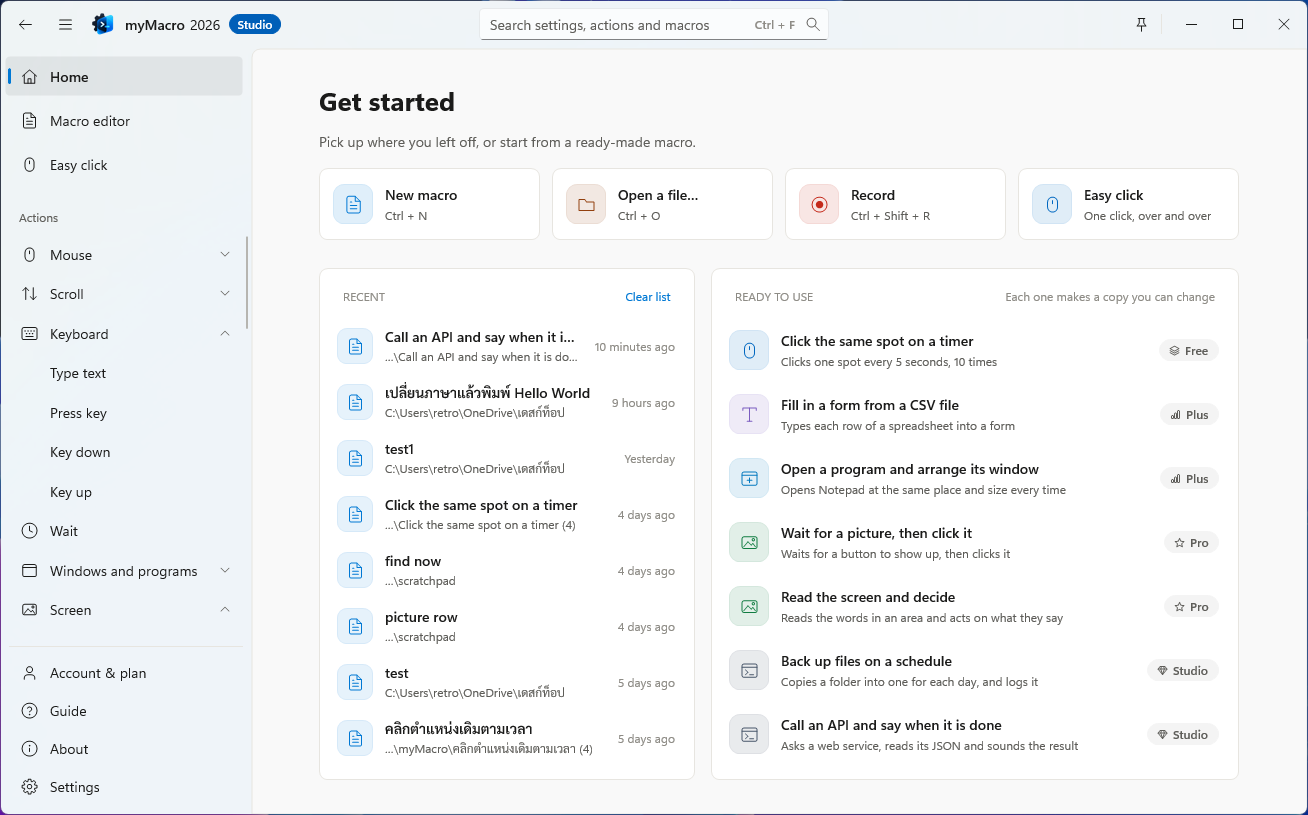
Record and replay mouse and keyboard macros, add conditions, wait for what appears on screen, and start work on a schedule
Free · Plus, Pro and Studio availableWindows
myMacro 2026 소개
myMacro 2026 is a Windows macro application rebuilt from the ground up in C++, continuing the development of myMouse 2019. Automate repetitive tasks by recording mouse and keyboard actions, or build a workflow one step at a time—from simple clicks and typing to tasks that wait for windows, find images, read on-screen text, and respond to conditions.
Start with Easy Click, record your actions, or adapt a ready-made sample. Arrange steps with drag and drop, collapse blocks, and undo changes in the editor. For more advanced workflows, use variables, data files, reusable macros, and step-by-step debugging.
The application is lightweight and available as an installer or a portable download. No additional .NET or Visual C++ Redistributable installation is required. Menus and help are available in Thai and English, with light, dark, and system themes. Macro files are stored locally and are not automatically uploaded when you connect an account.
Free / Plus / Pro / Studio editions
Each edition includes the features of the editions below it.
Free: Mouse clicks and movement, dragging, scrolling, text entry, keyboard actions, macro recording and playback, fixed delays, whole-macro repetition, loop blocks, and Easy Click.
Plus: Adds window management, launching programs, playing sounds, random delays, curved mouse movement, natural typing rhythm, and CSV-driven playback with one data row per pass.
Pro: Adds If / Else If / Else conditions, Try / Catch error handling, colour and image detection, on-screen OCR, clicking controls by name, screenshots, variables, clipboard operations, text and JSON / INI file operations, calling other macros, scheduled and event-based starts, and keyboard remapping.
Studio: Adds Command Prompt and PowerShell commands, HTTP requests to websites and APIs, computer shutdown, restart, sleep and lock actions, plus permission for commercial use and paid client work.
Creating, opening, editing, importing, saving, and exporting macro files is available in every edition, including after a paid licence or trial expires. Running advanced features requires the appropriate edition.
Try Pro free for 7 full days, or 168 hours, after connecting an account and verifying your email, subject to the trial terms.
주요 기능
Record mouse and keyboard actions with the time between events, then edit and replay the recording.
Enable the smart recording filter to combine continuous typing, tidy repeated events, and shorten long pauses.
Use Easy Click to click repeatedly at a fixed position or at the current cursor position.
Reorder steps with drag and drop, collapse blocks, duplicate or disable actions, and undo or redo edits.
Set repeat counts, playback speed, delays, and loop blocks within a macro.
Start from ready-made samples with instructions on what to change and which edition is required.
Find windows by title and program, then focus, move, resize, minimise, maximise, hide, show, or close them.
Use window-relative coordinates so target positions move with the window.
Click buttons, text fields, menu items, or tabs by the names Windows exposes, with an on-screen target picker.
Wait for colours, find images, and read pixel colours, with search regions and support for images at different sizes.
Read text from a screen region with OCR for use in variables and conditions, and save screenshots to files.
Build If / Else If / Else branches, combine conditions with AND / OR, and wait for a condition to become true or false within a time limit.
Handle errors with Try / Catch, retry failed actions, or choose whether to stop, continue, or jump to a named step.
Use variables and calculations, manage the clipboard, read and write text and JSON / INI files, and fill forms from CSV data one row at a time.
Keep variable values between runs, share them across macros or keep them specific to one macro, and view or edit saved values.
Call other macros or subroutines to reuse common steps across workflows.
Start macros with keyboard shortcuts, run them on a schedule, or trigger them when a window opens or the computer has been idle for a set time.
Run Command Prompt and PowerShell commands, capture their output, and send HTTP requests to websites and APIs.
Set breakpoints, run one step at a time, test conditions or image searches from the editor, and inspect playback logs.
Stop playback with a keyboard shortcut, with additional emergency-stop options and a Loop Guard to limit excessive loop iterations or jumps.
Randomise delays, move the mouse along curved paths, and adjust typing rhythm for more natural input.
Save macros as .mmx4 files and import XML-based .mmx3 files from earlier versions of myMouse.
Export a macro and its related files as a .zip package, review its contents before export, and open the package again in myMacro.
Recover saved drafts after an unexpected application exit and access the 10 most recent copies kept before overwriting a macro.
Work across multiple monitors and display scaling settings, with support for minimising to the system tray.
Check for updates automatically and choose when to install, with update metadata signature verification and SHA-256 file checks before installation.
Advanced features depend on your edition.
가격 및 에디션
Free
다운로드해서 바로 사용하세요. 가입도, 만료일도 없습니다.
฿0
가격은 계정당입니다. 모든 옵션은 한 번만 결제하며 자동으로 갱신되지 않습니다.
에디션
월간/ 30일
연간/ 년
2026 영구 구매한 번 결제
Plus사람 같은 입력과 창 제어
฿39
원할 때 직접 갱신 · 자동 결제 없음
29% 절약
฿330
월 약 ฿28 · 월간 결제보다 ฿138 저렴
฿950
평생 사용 · 2028년 12월 31일까지 2026의 모든 버전 무료 업데이트 · 3년 이상 쓰면 연간보다 이득
64-bit (x64) Windows 10 version 1809 or later, or Windows 11.
No additional .NET or Visual C++ Redistributable installation is required for general use.
Windows OCR requires the recognition components for the language you want to read. Using Tesseract requires a separate installation of Tesseract and the relevant language data.
An internet connection is required to connect an account, start a trial, validate an online licence, and download updates.
Account-based monthly, yearly, and trial licences work offline for up to 7 days after the last successful licence check, without extending beyond the licence expiry date.
An activated perpetual 2026 account licence does not expire. Computers without internet access can use a machine-bound offline key for the purchased licence period.
Scheduled and event-based starts require myMacro to remain running and the computer to be awake and operational.
버전 기록
버전 2026.0.928.7402026년 9월 28일
New
Work in Excel (Pro). Have Excel itself do the work, on a workbook it has open too: open or make a workbook (from a template if you like); read a table, a cell or the sheets' names; write a cell, a formula or a whole table; add rows under a table, put rows in or take them out; format cells; work the formulas out; save; export to PDF or CSV; close; and add, rename or remove sheets. Works with .xlsx, .xlsm, .xlsb and .xls
Work in a browser (Pro). Drive Edge or Chrome in a profile of myMacro's own, apart from the browser you use: open a page, go to an address, back, forward, reload, and work with tabs; find a part of the page by the words it shows, such as "Sign in", or a CSS selector, and click it, type into it, choose, tick, read its text, read a table, wait for it to come or go, or upload a file; wait for a download to finish, save a picture of the page, and run a script in the page (Studio)
Code colours in the macro list, the way Visual Studio colours code, in the light and the dark theme: actions, blocks, words in quotes, {{names}}, numbers and notes. Settings › Code colours turns them off
Undo and Redo lists. The small arrow beside Undo and Redo lists the changes, such as "Delete row 3: Left click"; choose one to go back or forward several at once
Improvements
Text boxes are as crisp and dark as the drop-downs beside them
Scroll bars no longer draw a grey band under the pointer, only the thumb
버전 2026.0.927.9132026년 9월 27일
New
Search everything from the title row. The box in the middle of the title row (Ctrl+F) goes to a page, a command, any setting, an action to add, a row of the macro, or a macro opened lately or in the library, by its English or Thai words
Work with an Excel file, without Excel (Pro). Read a table or a cell; write a cell, a formula or a whole table; add rows under an Excel table; and add, rename or remove sheets, keeping the workbook's styles, charts, pictures, PivotTables and macros
Tables and CSV files (Pro). Read and write CSV, Thai included, the way Excel opens it; filter, sort, group, total, average, and join two tables on a column they share
Files and folders (Pro). Copy, move, rename and recycle; list the files that match a pattern such as *.pdf; wait until a file arrives or is finished; and make or take apart a ZIP
Text, lists and JSON (Pro). Replace, match a pattern, split, trim and change case; work with a list; read and change JSON; and read inside a JSON variable in any row, such as {{resp.items[0].name}}
Ask the user mid-run. A message with buttons of your own, or a box to type in, which can close by itself after a time (a message is Plus; an answer kept to decide on is Pro)
Windows and controls. Wait for a window to open, close or come to the front; keep a window on top, centre it, move it to the next screen, make it see-through or rename it; give a control in a window text, read it, tick it, choose it or wait for it without moving the pointer (Pro); {{win_id}} keeps hold of the window found
Steer a run. Leave a loop, go on to the next pass, end the run; raise an error, return a value from a sub, and wait until a time such as 17:30 (Pro); a sub takes values, and its variables are its own
Always on top with the pin beside the minimise button, Back at the top left (Alt+Left), a status bar you can hide, and a macOS-style macro table
Improvements and fixes
A tall Windows 11 title row: larger minimise, maximise and close buttons, with snap layouts; text size, theme and minimise to tray are in Settings and the search
Thin scroll bars in drop-down lists and in text boxes of several lines
The page is Windows 11's neutral grey; Home's tiles turn grey under the pointer
About no longer runs into the status bar on a short window
The Smart filter switch is no longer cut to its first letter
A settings file is no longer lost if Windows fails halfway through replacing it
The question before a macro from elsewhere plays names what it does: a web request, a file written, or a file or folder job
More ways for a macro to start itself (Pro). On chosen days and times of the week, at sign-in to Windows, when a file arrives or changes in a folder (by a pattern such as *.csv), when a USB drive is plugged in, when Wi-Fi connects or disconnects, when a program closes, and when another macro finishes. {{trigger}} says what started the run
A queue that keeps its runs. Triggered runs go one at a time, however many files arrive at once; what waits survives closing myMacro or a power cut, and a run cut off halfway is never started again by itself
Esc stops and pauses. Nothing waiting starts until "Resume triggers" in the tray menu or on the Macro library card
A history of every run. How it started and ended, what stopped it, and what it did outside myMacro
Every action in the pane, grouped as in the Add action menu
Improvements and fixes
Esc stops a run at once even while the window is busy, and works through a remote desktop, as does "Stop when I use the mouse or keyboard"
Recording through a remote desktop keeps what was done
A network folder that stops answering no longer freezes myMacro
Tray notices no longer hide one another
The question about programs run as administrator no longer holds up the queue
"From the screen" after a recording now answers the question
The Play shortcut plays and stops. It always starts from the first row and stops the run when pressed again, just as the Play button does; nothing is paused so that it only looks stopped
Waits for you to let go of the shortcut. A run started from the keyboard waits until the shortcut's keys are up, so a Ctrl or Shift still held never joins the macro's first keys
Continue at a breakpoint. The window comes back at a breakpoint with Step and Continue
Improvements and fixes
A stopped run says which row it stopped at, and right-click › "Play from here" carries on from it
Click a control by its name. A new row names the button or box it wants instead of a position, and still clicks it when the window has moved, the screen is another size or the list has been scrolled. "Pick…" takes one off the screen
Never clicks through a window in front. When another window covers the control, its window is brought forward first; or press the control without moving the pointer at all
Look for a picture in one area, which is quicker and cannot find the same picture elsewhere; let it count at other sizes; and "Find it now" frames what it found
Send a macro with its files. The macro, the macros it runs, its data file, sounds and pictures go in one .zip that opens and plays where it arrives, with a check of what goes in, and what is missing, before it is written
Tell apart controls that share a name. Choose which one to click -- the second Delete of a list -- and "Pick…" works the number out for you
Unsaved work comes back. If myMacro stops without closing, the next start offers the changes back
Copies from before a save, ten of them, from the menu beside Save
Kept values can belong to one macro, and can be seen, changed, moved or forgotten one by one in Settings
Improvements and fixes
About shows the commit this build was made from beside its version
Numbers and positions are always set in the JetBrains Mono that comes with myMacro; some computers showed Consolas instead
A recording measured from a window stops and says so when the window is not there, instead of clicking in the wrong place
A nearly full macro no longer goes past 10,000 rows when a recording is added
A web request that fails leaves no old answer in its variables
Kept values that cannot be saved are said and tried again, not lost
Delays in a macro now keep the length they were set to; a macro with delays under 15 ms plays faster than before, so raise the delay if the target program cannot keep up
Recording times each pause to the millisecond, and natural mouse movement is smoother
The account page on the website no longer scrolls away, and Enter works in every field instead of clicking the button
Email from the service is less likely to land in a junk folder