
PDF to Image
PDF to Images. Images to PDF. Fast, Native, Standalone.
FreeWindows
PDF to Image について
Two tools in one small native Windows app, written in C++20: turn PDF pages into images, and turn **images into
one PDF. No .NET, no runtime to install, no third-party libraries.**
できること
### Images → PDF
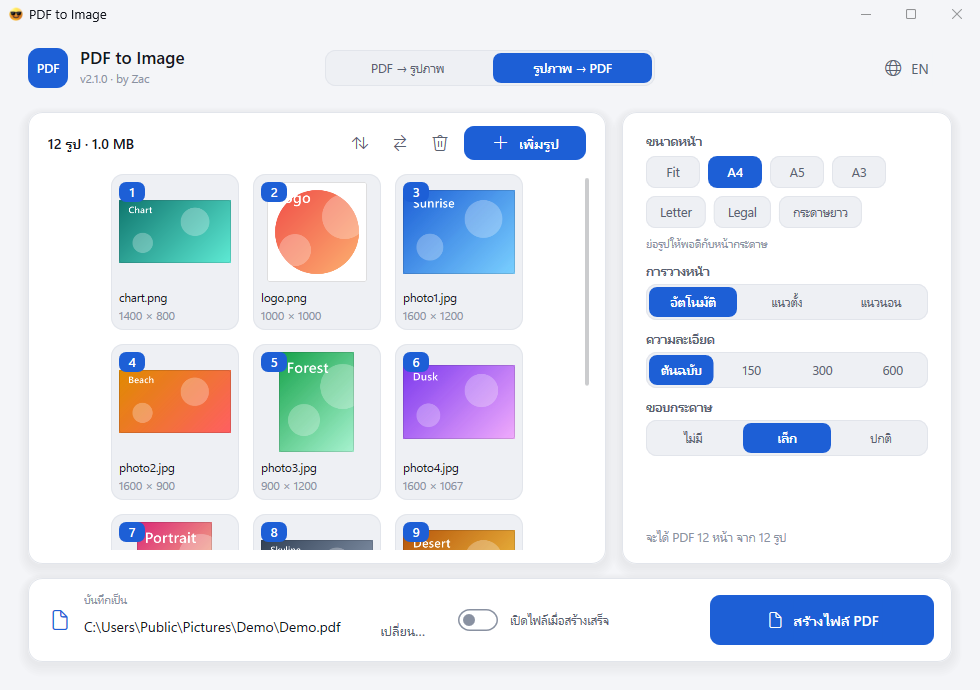
- Many images become one PDF: JPG, PNG, BMP, TIFF, GIF, ICO, and WebP, HEIC, AVIF or JPEG XR when Windows has
the codec. Pick files, drop files, or drop a whole folder
- Arrange the pages yourself: drag a picture to move it, turn it left or right, remove it, sort by name
(natural order, so img2 comes before img10) or reverse the list
- Page size
- Fit: every page is exactly the size of its image
- A4, A5, A3, Letter, Legal: the image is scaled to fit inside the margins and centred
- Long paper: all images stacked on one continuous page. If that would pass the PDF limit of 200 inches, the
page is cut between two images
- Orientation: auto (each page follows its image), portrait or landscape
- Resolution: original, 150, 300 or 600 DPI. Images denser than that are reduced to save space; in Fit mode it
also sets the page size (pixels ÷ DPI)
- Margin: none, small (10 mm) or normal (20 mm)
- Quality is kept: JPEG files go into the PDF byte for byte, PNG / BMP / GIF / TIFF are stored losslessly with
their transparency, EXIF orientation from phones is honoured. Photos in formats that are normally lossy (WebP,
HEIC, AVIF) are stored as high-quality JPEG
- A thumbnail of every picture, progress with time remaining, cancel at any moment (no half-written PDF is left)
### PDF → images
- Drop a PDF on the window or press Ctrl+O; password-protected PDFs work
- JPG, PNG, TIFF, BMP at 96 / 150 / 300 / 600 DPI, JPG quality slider, transparent PNG backgrounds
- Paper size: Auto (the page's own size), A5, A4, A3, Letter, Legal. A fixed size keeps the page's aspect ratio and
pads the rest instead of stretching it
- Convert all pages or a selection such as
1-3, 8, 12-, with a live count and validation - Progress with speed and time remaining, taskbar progress, cancel at any moment
### Both
- Switch tools with the toggle at the top. Drop a PDF or images anywhere and the app switches to the right tool
- Light and dark theme (follows Windows), Thai and English UI, per-monitor DPI aware
- Remembers your settings
ダウンロード
バージョン 2.1.0 · 2026年11月7日
- Setup EXEWindows · インストーラー · 2.5 MBダウンロード
システム要件
64-bit Windows 10 or Windows 11
バージョン履歴
バージョン 2.1.02026年11月7日
### Images → PDF
- Many images become one PDF: JPG, PNG, BMP, TIFF, GIF, ICO, and WebP, HEIC, AVIF or JPEG XR when Windows has
the codec. Pick files, drop files, or drop a whole folder
- Arrange the pages yourself: drag a picture to move it, turn it left or right, remove it, sort by name
(natural order, so img2 comes before img10) or reverse the list
- Page size
- Fit: every page is exactly the size of its image
- A4, A5, A3, Letter, Legal: the image is scaled to fit inside the margins and centred
- Long paper: all images stacked on one continuous page. If that would pass the PDF limit of 200 inches, the
page is cut between two images
- Orientation: auto (each page follows its image), portrait or landscape
- Resolution: original, 150, 300 or 600 DPI. Images denser than that are reduced to save space; in Fit mode it
also sets the page size (pixels ÷ DPI)
- Margin: none, small (10 mm) or normal (20 mm)
- Quality is kept: JPEG files go into the PDF byte for byte, PNG / BMP / GIF / TIFF are stored losslessly with
their transparency, EXIF orientation from phones is honoured. Photos in formats that are normally lossy (WebP,
HEIC, AVIF) are stored as high-quality JPEG
- A thumbnail of every picture, progress with time remaining, cancel at any moment (no half-written PDF is left)
### PDF → images
- Drop a PDF on the window or press Ctrl+O; password-protected PDFs work
- JPG, PNG, TIFF, BMP at 96 / 150 / 300 / 600 DPI, JPG quality slider, transparent PNG backgrounds
- Paper size: Auto (the page's own size), A5, A4, A3, Letter, Legal. A fixed size keeps the page's aspect ratio and
pads the rest instead of stretching it
- Convert all pages or a selection such as
1-3, 8, 12-, with a live count and validation - Progress with speed and time remaining, taskbar progress, cancel at any moment
### Both
- Switch tools with the toggle at the top. Drop a PDF or images anywhere and the app switches to the right tool
- Light and dark theme (follows Windows), Thai and English UI, per-monitor DPI aware
- Remembers your settings