
mySpec
See your computer's full specification in one click, with nothing to install, ready to paste into a listing
FreeWindows
关于 mySpec
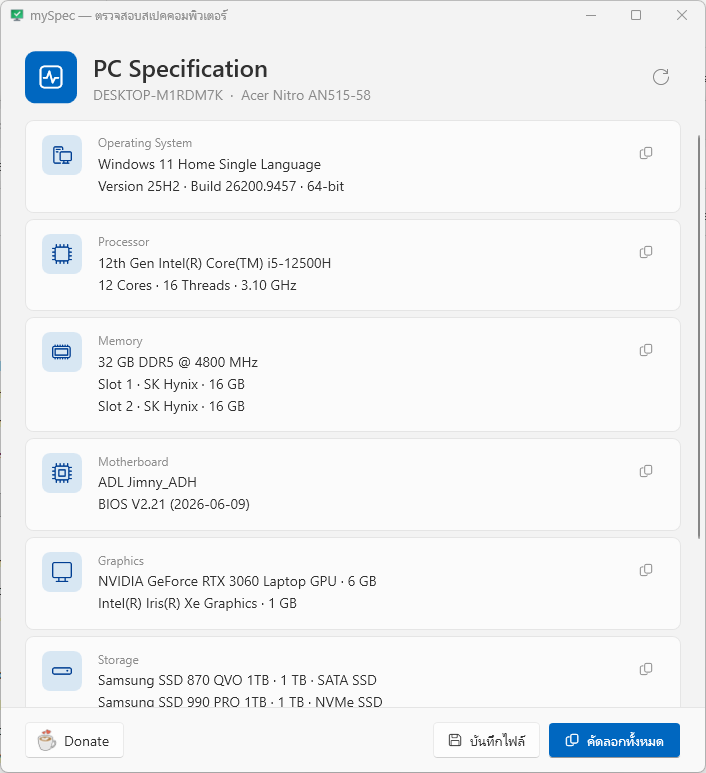
mySpec gathers your computer's specification and shows it clearly within seconds: the operating system, processor, memory, motherboard, graphics card, storage, optical drives and audio devices.
It suits anyone who wants to know their machine before upgrading, anyone selling a second-hand computer or laptop, and shops that prepare specifications for customers. Copy the text and paste it straight into a listing; accurate details reassure buyers and save repeated questions.
Made in Thailand. Nothing to install: extract it and double-click to open.
功能
- Operating system, processor (cores, threads and speed), and memory slot by slot
- Motherboard, graphics card, every storage drive, optical drives and audio devices
- Copy everything as text in one click
- Small and light on resources, with nothing to install
版本历史
版本 1.1.0.02026年9月18日
Appearance
Windows 11 Settings-style design: Categories are displayed as icon-based cards; the device name and notebook model appear at the top, with a button bar at the bottom.
Automatic system-wide dark/light mode support and Mica background effect.
Redesigned "Donate" window: The QR code is now always placed on a white background to ensure it remains scannable in dark mode.
Usability
The window no longer freezes upon opening, as data reading has been moved to a background process; a loading bar is displayed during this time.
Replaced standard message boxes with toast notifications that appear and automatically disappear.
New buttons:
Copy individual items
Save as .txt file (Ctrl+S)
Refresh data (F5)
Copy all (Ctrl+Shift+C)
More detailed information
GPU: Displays all cards along with VRAM; previously only the RTX 3060 was visible, but now the Iris Xe is also shown.
Storage: Indicates interface type (NVMe or SATA) and drive type (SSD or HDD); capacity is displayed using the same units found on the label (e.g., 1 TB instead of 932 GB).
OS: Added version (25H2), build number, and architecture (64-bit).
Others: Motherboard info includes BIOS version; RAM details are broken down by slot; speaker info indicates the default device.
Bug fix: BIOS year previously displayed in the Buddhist Era format (e.g., 2569) due to Thai system language settings; this has been corrected to the Gregorian calendar format.