Vigil Antivirus
Antivirus software for Windows featuring real-time protection, file scanning, and automatic updates.
FreeWindows
About Vigil Antivirus
Protect your Windows computer from viruses, malware, and ransomware; it runs in the background at all times and updates itself automatically.
What it does
Malware protection
- Real-time protection checks files the moment they are created, downloaded or opened.
- Launch check: suspicious programs are held before they start, until you decide.
- Behaviour monitoring catches programs that act like malware even before they are in any database, such as a program that copies itself and sets itself to start with Windows.
- Several sources: ClamAV, MalwareBazaar, YARA rules and an AI risk model, with in-depth analysis of .NET programs.
- Online check of new programs against known malware. Only the file's fingerprint (SHA-256) is sent.
- Script protection: PowerShell and other scripts are checked through Windows' AMSI before they run.
- Attack surface reduction: rules that block attackers' most common tricks. Examples are Word or Excel starting PowerShell, scripts starting downloaded programs, Windows tools running code from the web, and the deletion of backups before encryption.
- Keylogger protection warns when a program tries to record what you type.
- Whole-attack cleanup: when malware is quarantined, Vigil stops the programs it started, quarantines the files it created and removes its startup entries.
- Memory of quarantined malware: copies of the same file elsewhere are detected at once.
- Quarantine keeps dangerous files safely apart, and they can be restored after a false alarm.
Ransomware and system protection
- Ransomware protection watches for programs encrypting many files and stops them.
- Boot area protection (MBR / GPT): Vigil sees every write to the start of the disk, stops untrusted programs and writes the original back, so the computer still starts.
- Bootkit protection guards the boot sector of the Windows drive, the EFI partition and the Windows boot manager. It undoes deletion, unsigned replacements and old vulnerable versions.
- Self-protecting malware is stopped: malware that makes Windows crash when it is closed, or whose processes watch each other, is still stopped without crashing the computer.
- Tamper protection: malware, even with administrator rights, cannot stop the service, switch Vigil off, change its settings or replace its files. If Vigil is stopped by special means, Windows starts it again within seconds.
Web and network
- Web protection blocks connections to known malware and phishing sites (abuse.ch, OpenPhish), and you can block or allow sites yourself.
- Firewall: see which programs are online, with their speed, data and destinations. Decide per program whether it may use the internet or the home network. You are alerted when an unsigned program goes online for the first time. It works with Windows Firewall.
- Home network map: every device on your network, with brand and type. You are alerted to new devices and faked routers. Wi-Fi, the router and devices' risky ports are checked.
- Network settings watch catches hosts file, proxy and DNS changes that malware makes to send you to fake sites, and fixes them in one click.
- Secure DNS looks up sites through Quad9 or Cloudflare, which refuse malware and phishing sites (with an adult-content filter option). It is encrypted on Windows 11 and off by default.
Windows security
- Windows security checkup: 12 checks every day, most fixable in one click. They cover SMBv1, Remote Desktop, UAC, Windows Update, firewall, SmartScreen, PowerShell 2.0, the Guest account, AutoRun, LSA protection, Secure Boot and drive encryption.
Scanning
- On-demand and scheduled scans: quick, full or a chosen folder, in a separate window that can be closed while the scan continues.
- Right-click "Scan with Vigil" from the first-level Windows 11 menu, for files, folders and several items at once.
- USB drive scan: removable drives are scanned when plugged in, and worms that spread through shortcuts or autorun.inf are caught.
Notifications and everyday use
- Notifications page: threats, firewall, network and scans in one place, sorted by importance, with several items handled at once.
- Notifications at the bottom right of the screen have Quarantine or Allow / Block buttons, so you can decide at once without opening the program.
- Quiet mode: while a game, film or presentation is full screen, notifications wait and scheduled scans are postponed. Threats that need your decision still come through at once.
- Weekly summary: see on the Home page what Vigil stopped this week.
- A modern look: light and dark themes, and Mica / Acrylic backgrounds on Windows 11. Thai and English, following Windows' language.
Updates and privacy
- Automatic updates of the virus database and the program. Every release is digitally signed and verified before it is installed.
- Easy installation: one installer file, in Thai and English, with its SHA-256 for checking.
- Privacy: your files never leave your computer. Detection reports are anonymous and off by default.
- Free, and works alongside Microsoft Defender and Windows Firewall.
Download
Version 2026.0.1127.2308 · 27 Nov 2026
- SETUP EXEWindows · Installer · 6.0 MBDownload
System requirements
- Windows 10 or Windows 11 (64-bit)
- 4 GB of RAM or more (8 GB recommended; Vigil uses approximately 1 GB to load the virus database)
- 500 MB of free disk space
- Internet access (for updating the virus database)
- Administrator privileges (required for installation)
Version history
Version 2026.0.1127.230827 Nov 2026
- Start-up programs: everything that starts with Windows in one list (Run keys, the Startup folders, scheduled tasks, services), with who signed it, what it cost the start-up where Windows measured it, and a switch that deletes nothing.
- Camera and microphone: which programs use them and when, and an alert when a program without a digital signature starts to. Vigil only reads the record Windows keeps.
- Browser protection: the extensions of Chrome, Edge, Brave and Firefox, a block for risky ones (Chromium browsers), settings forced by a policy, and changed browser shortcuts, with Remove and Put back.
- Outdated programs: programs with a newer version waiting (through winget), the often-targeted ones first, updated one at a time.
- A redesigned installer: a wider window that introduces Vigil's features one at a time while it installs, and ends with Start device assessment (a quick scan and the security checkup). The anonymous detection reports box is ticked when it opens, can be unticked, and has a "?" that explains what a report holds.
- Support the developer button under Settings › About. Vigil stays free.
- Home buttons in the state's colour, the Quarantine list as one card, and the file's path on "New on the network".
Version 2026.0.1127.145527 Nov 2026
Installer and updates
- A new installer that looks like those of our other programs: one card, a Thai/English switch, and Windows' light or dark theme. The bar follows the real installation steps. A failure names its cause and links to the installation log, and running the installer again repairs Vigil.
- The installer is named
Vigil-Setup-<version>-x64.exeand comes with its SHA-256 for checking. It also checks the program files it carries before installing them. - Version numbers now read
2026.0.MDD.HHMM. Copies on 1.x update to them as usual. - All protection starts the moment the computer starts, without waiting for the virus database to load. The full database loads in the background.
- Before a new virus database is used, the updater checks the owner and permissions of its folder. If that check fails, the previous database stays in use.
Malware detection
- New programs are checked against an online list of known malware through Vigil's server. Only the file's fingerprint (SHA-256) is sent.
- Whole-attack cleanup: when malware is quarantined, Vigil stops the programs it started, quarantines the files it created and removes the startup entries it set.
- Vigil remembers quarantined malware. A copy of the same file elsewhere is detected at once.
- Programs that copy themselves under another name and set themselves to start with Windows are caught and stopped without asking.
- Deeper analysis of .NET programs, to catch malware loaders, remote access trojans, data stealers and screen lockers.
- Malware that renames its code section to look like data is caught. In a test set of 188 malware samples, detections rose from 60 to 124, with no more false alarms.
- Scanning PowerShell scripts before they run (AMSI) matches virus signatures correctly, and Vigil checks scripts before Microsoft Defender.
- A file counts as Microsoft's only when its signature chains to a real Microsoft root. Other vendors' drivers are checked like any signed program.
- Programs merely named "setup" or "install" no longer get the leniency given to real installers.
- Fewer false alarms: UPX-packed programs, Vigil's own installer, .NET files that Windows compiled, and Microsoft Store apps are no longer reported. Across 54,319 installed programs, false alarms fell from 3 to 1.
- Faster: a file's digital signature is checked once per scan.
- When Windows drops file-change notices, Vigil checks recently changed files again. After Vigil was stopped abnormally, it checks running programs and startup entries again.
Ransomware
- Ransomware that finishes too quickly to stop is recorded and its program quarantined, with a list of the damaged files.
- The program that encrypted the files is named correctly, even after it has ended and Windows has given its process number to another program. Before, Edge could be blamed by mistake.
- Microsoft programs in Program Files that behave like ransomware are stopped and recorded, but not quarantined on behaviour alone.
- More large image, audio and video formats are recognised, so editing and recording programs are not mistaken for encryption.
Boot and bootkit protection
- The start of the disk (MBR / GPT) is protected. Vigil sees a program writing to it at once, stops that program and writes the original back, so the computer still starts even when the malware forces a restart right away.
- A last check of the boot area runs before Windows shuts down or restarts, and Petya-style boot loader changes are caught.
- The boot sector of the Windows drive (BitLocker included), the EFI partition and the Windows boot manager are protected. Deletion, an unsigned replacement and an old vulnerable version (BlackLotus style) are all undone.
- Commands that ransomware and bootkits run before a restart are caught, such as forcing Safe Mode or turning off signature checks.
- Malware that marks itself as a critical process is stopped without crashing Windows. All processes of an attack are stopped at once, so malware whose processes watch each other (like MEMZ) cannot react.
Tamper protection
- Other programs, even with administrator rights, cannot stop Vigil's service, switch it off, or change its registry, files or settings. Anything that slips through is put back and recorded.
- Programs that try to switch Vigil off are stopped and quarantined. If Vigil is stopped by special means, Windows starts it again within about a second.
Network and firewall (new)
- A Network page shows which programs are using the internet, their speed, today's data, their destinations and their listening ports.
- Firewall: works with Windows Firewall to decide per program whether it may use the internet or the home network.
- It alerts you when an unsigned program goes online for the first time.
- A strict mode holds unsigned programs offline until you allow them.
- It can lock the computer down on public networks.
- Home network map: every device with its brand and type.
- It alerts you to new devices and to a faked router.
- It checks Wi-Fi, UPnP and risky open ports on devices.
- The Network menu item shows a red count of what is waiting for a decision. The page has a card that says which tab each item is on.
Web protection
- Phishing sites from OpenPhish are blocked, and you can block or allow sites yourself.
- The hosts file, proxy and DNS settings that malware likes to change are watched, and can be fixed in one click.
- Secure DNS through Quad9 or Cloudflare (with an adult-content filter option), encrypted on Windows 11. The previous DNS comes back when it is turned off or Vigil is uninstalled.
Windows security checkup (new)
- 12 checks every day, fixable in one click for most. They cover SMBv1, Remote Desktop, UAC, Windows Update, firewall, SmartScreen, PowerShell 2.0, the Guest account, AutoRun, LSA protection, Secure Boot and drive encryption.
Notifications
- A Notifications page gathers everything in one place: threats, firewall, network, scans and the weekly summary. It has Critical / Warning / Information tabs and a red count on the menu.
- Notifications at the bottom right of the screen have buttons for an immediate decision, such as Quarantine or Allow / Block, without taking the keyboard from your work.
- Quiet mode while a game, film or presentation is full screen, and a weekly summary on the Home page.
- Several items can be quarantined, deleted or allowed at once.
Interface
- A completely new look:
- a sidebar, and protection cards you can switch on and off at once;
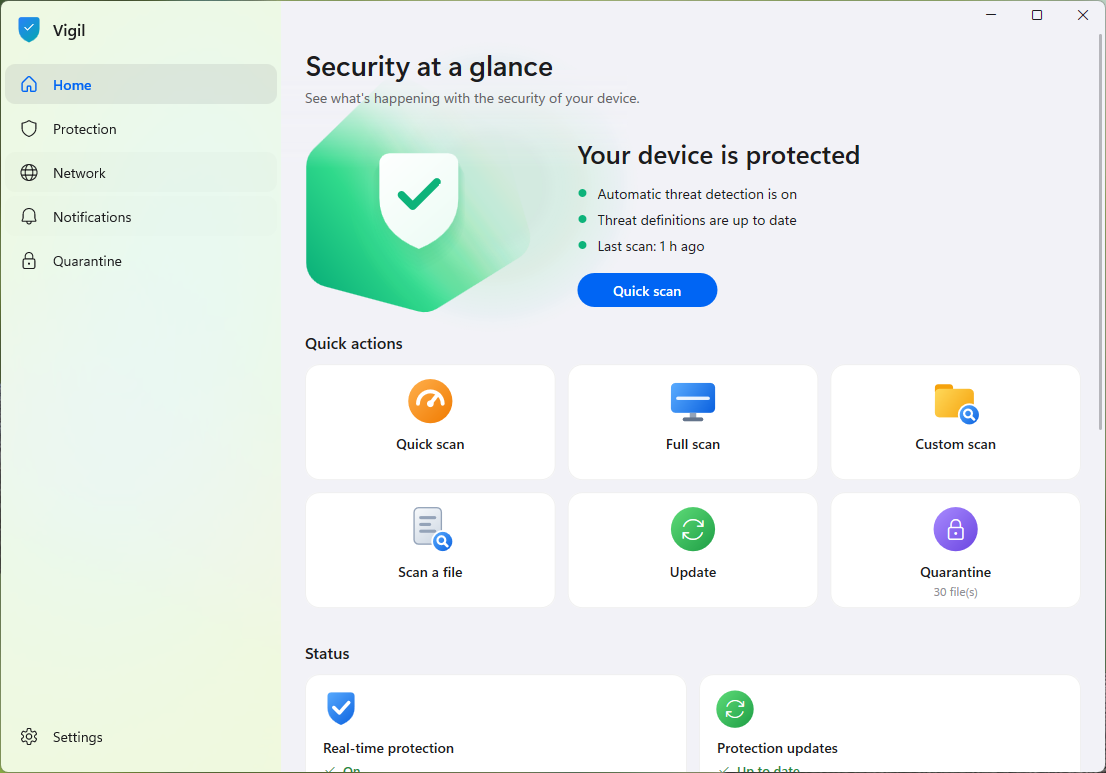
- settings in pages and tabs, and quick actions on Home;
- a separate scan window that can close while the scan goes on.
- The top of the Home page is a large shield on a colour that shows the state (green, orange, red, blue).
- Rounded cards and buttons, new colour icons and the Thai font Sarabun. On Windows 11, Mica / Acrylic backgrounds and no title bar. Pop-up menus for choices and new confirmation dialogs.
- "Scan with Vigil" is in the first level of the Windows 11 right-click menu, and several files can be scanned at once.
- The window opens centred. An administrator can open it with administrator rights straight away; Windows asks once.
Security and privacy
- Before deleting or quarantining, Vigil checks that it is still the same file. Commands from a standard user can do only what that user may do.
- Ordinary programs cannot stop scans set up by an administrator. Excluding a file extension no longer lets programs skip the check.
- The exclusions page warns when an excluded folder is one that ordinary programs can write to.
- Standard users do not see other users' files and connections.
- Records of attempts to change Vigil itself no longer offer "Allow".
Other fixes
- The false "Behavior:Win32/Tamper.VG — Vigil (data folder)" record no longer appears after a virus database update.
- The uninstall confirmation comes to the front and shows progress. The window buttons work when the window is maximised.
- Copies that updated themselves get the Windows 11 "Scan with Vigil" menu.